
How Nigerian Online Sellers Can Set Up Instagram Story Highlights
Instagram Story Highlights let Nigerian online sellers organise selected Stories into collections that people can revisit after the usual 24-hour Story period. Start with useful topics such as Products, Delivery, FAQs and Contact. Publish accurate Stories, save them in Highlights, give each collection a clear name and review it whenever your business details change. Highlights can help visitors find answers without scrolling through old posts, but they do not guarantee enquiries, reach or sales.
What are Instagram Story Highlights?
A Highlight is a collection of Stories that an account chooses to keep accessible on its profile. Unlike an ordinary Story, which usually stops appearing after 24 hours, a selected Story can remain in a Highlight until it is removed. Instagram introduced Highlights alongside a private Stories Archive so account owners could reuse past Stories. The way Highlights appear on profiles and the position of the controls may differ by app version or account.
Which Highlights should a Nigerian online shop create?
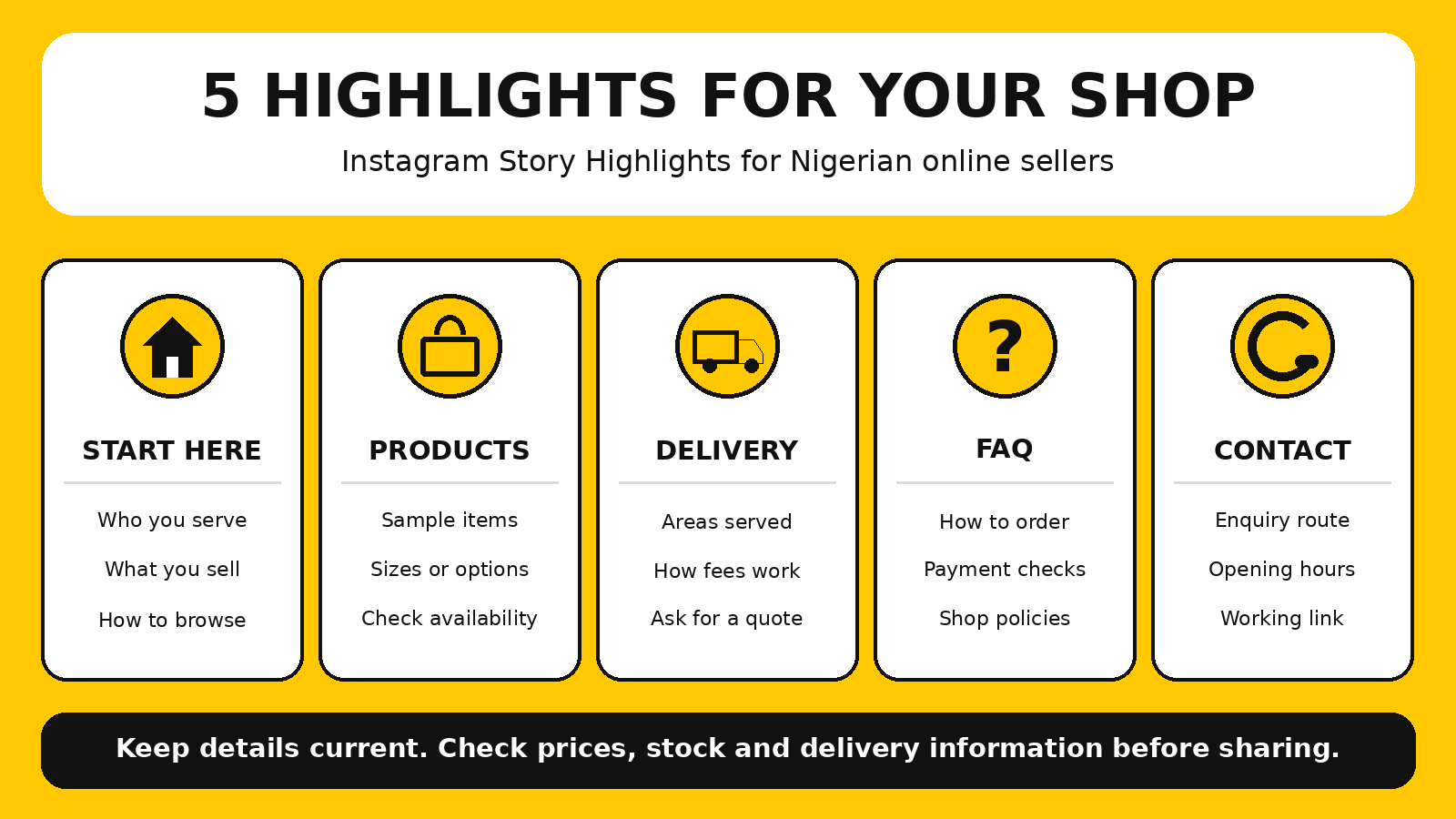
Start with four or five categories, not every possible topic. Choose the ones that answer questions your customers actually ask. The examples below are suggestions, not mandatory Instagram settings.
| Highlight | What to include | What to check regularly |
|---|---|---|
| Start Here | Who you serve, what you sell and how to browse | Current business focus and contact route |
| Products | Clear product examples, variations and where to see availability | Stock, sizes, colours and prices |
| Delivery | Areas served, how fees are confirmed and dispatch process | Coverage, charges and estimated timing |
| FAQs | Ordering, payment verification, exchanges and common questions | Actual shop policies and processes |
| Contact | How to enquire, business hours and the correct link or number | Working links and response hours |
Step 1: Check that your Stories are being archived
Instagram's Stories Archive is a private collection of Stories saved for the account owner when archiving is enabled and the feature is available. If you want to select older Stories for Highlights, check your archive settings before relying on them. On many versions of the app, you can find archiving controls through your profile menu and the archive or archiving settings.
Do not assume a Story will be available later if you have turned archiving off. If a particular Story is important, keep a permitted copy of your original photo or video in your own files. Avoid saving or reposting customer photos, private messages or testimonials without appropriate permission.
Step 2: Create your first Instagram Highlight
- Open Instagram and go to the profile you manage.
- Find the option labelled New, Story highlight or the equivalent Highlights control. Its position can vary.
- Select one or more eligible Stories from the choices shown.
- Tap Next or the equivalent button, choose a cover and enter a short, descriptive name.
- Save the Highlight, then open it from the profile to confirm the Stories play in the intended sequence.
If you have just published a Story, the Story viewer may also offer an option to add it to a Highlight. If you cannot see that control, try the Highlights section on your profile or the Stories Archive. Do not follow a tutorial blindly if your current app uses different labels.
Step 3: Give every Highlight a clear job
Each collection should answer one type of visitor question. For example, a Products Highlight can show a product, its main variations and where to check current availability. A Delivery Highlight should explain how customers obtain accurate fees, not display a price list that becomes wrong after a courier changes its rates.
A simple three-Story sequence works as a starting structure:
- Introduce the topic: “How delivery works” or “Browse our ready-to-wear collection.”
- Answer the key question: explain the process with a short caption or visual example.
- Give one next step: “Send your area for a delivery quote” or “Check the current collection link in our profile.”
These are editorial suggestions, not a requirement to use exactly three Stories. Add more only when they make the answer clearer.
Step 4: Design covers people can recognise
Highlight covers are small visual labels, so simple usually works better than detailed artwork. Use one icon or a short word per cover. Keep the contrast strong, place the main icon near the centre so it survives a circular crop, and use consistent colours across the set.
Step 5: Make product and delivery information trustworthy
For changing information, use wording such as “Message us to confirm the current price and availability” rather than a permanent-looking price claim. If you do show a price or offer, add its relevant date or conditions and remove the Story when it expires. Do not show a customer review or order receipt without permission, and never expose phone numbers, addresses or payment details.
If your shop offers collection, local dispatch or delivery to selected states, describe the actual process. Customers should know what information to provide, how you confirm the fee and when they will receive an update. Do not promise that a parcel will arrive on a particular day unless you can reasonably honour it.
Step 6: Add, edit or remove Stories when things change
Open an existing Highlight and look for its edit option. On many versions of Instagram, you can press and hold the Highlight or open its menu, then select Edit Highlight. From there, review the selected Stories, change the title or cover and remove content that is no longer useful.
Review the five collections as a customer would: start at the profile, open each Highlight and check whether the first Story explains the topic. Remove duplicate slides, broken links and outdated claims. Be careful when deleting material from the underlying Stories Archive because this can affect where the Story remains available.
What if Instagram Highlights are missing or not updating?
First confirm that you are signed into the correct account. Check whether the Highlights controls have moved to another part of your profile, whether the Story is eligible to be selected and whether saving Stories to the archive is enabled. An app update or a temporary feature issue can also change what you see.
Common mistakes to avoid
- Too many collections: visitors struggle to find basic information when every campaign has its own Highlight.
- Vague names: “Vibes” may mean something to the owner but not to a new customer looking for delivery details.
- Old prices or offers: expired information can cause confusion and complaints.
- Unreadable covers: tiny text and crowded images disappear inside small circles.
- Unverified testimonials: do not invent customer feedback or publish someone else's message without permission.
- Missing next steps: a useful explanation should also tell visitors how to enquire or find current details.
- Assuming guaranteed sales: Highlights organise information; they do not make people buy.
A practical example for a Nigerian fashion seller
Imagine a small clothing shop that receives repeated questions about sizes, delivery and how to order. The owner creates Start Here, Products, Delivery, FAQs and Contact collections. Products shows sample outfits and explains how to confirm sizes. Delivery explains how to request a quote. FAQs answers common ordering questions. Contact points to the current enquiry route.
How Highlights fit with Sirgoviral and other promotion
Highlights are an organic Instagram profile feature. They help explain your business to people who choose to visit, while paid engagement services are separate activities with different requirements and risks. Neither guarantees recommendations, enquiries or sales.
If you are researching social media promotion separately, you can review the Sirgoviral service catalogue and compare the current descriptions, requirements and platform rules before making a decision. New users can visit the Sirgoviral sign-up page. Do not treat paid engagement as a substitute for accurate product information or genuine customer communication.
Frequently asked questions
Can I make an Instagram Highlight without an existing Story?
Highlights are built from Stories. Publish an appropriate Story first, then add it to a Highlight using the controls available on your account. Check your archive settings if you plan to reuse it later.
Do Instagram Story Highlights disappear after 24 hours?
No. Selected Stories can remain available in a Highlight after the ordinary Story period ends, until the account removes them or the content becomes unavailable.
What Highlights should an online seller create first?
Start with the questions customers ask most often. Products, Delivery, FAQs and Contact are useful examples, but a service business may need Services and Booking instead.
Why can I not see my old Stories when creating a Highlight?
Check whether the Stories were saved in your archive and whether the feature is available on the account. The exact interface and available content can differ by account and app version.
Will Instagram Highlights increase my sales?
There is no guarantee. They may make information easier to find, but actual sales depend on your offer, pricing, trust, customer needs and follow-up.