SMM Start Count vs Remains: What They Mean on Your Order
Start count is the baseline number recorded for a social media metric when an SMM order is measured. Remains usually means the quantity the order system still records as outstanding. They are not the same thing. To understand your order, compare both fields with the quantity you requested and the current order status. Neither number alone proves what appeared on the public post or profile.
Start count, quantity and remains: the difference
These labels appear in many social media marketing (SMM) order systems. Sirgoviral's published API reference includes the fields start_count, remains and status in its illustrative order-status response. The labels may be presented differently in a customer dashboard, and not every service uses the same measurement method.
| Field | What it generally tells you | What it does not prove |
|---|---|---|
| Start count | A recorded starting metric, such as existing likes or followers. | That the count was captured at the exact moment you placed the order. |
| Quantity | How many units you requested for that order. | How many people will become customers or fans. |
| Remains | How many requested units are still recorded as outstanding. | That those units will definitely arrive, or that a refund is automatic. |
| Status | The system's current label for the order, such as In progress or Partial. | A live, independently verified public count. |
Always read these fields together. An order marked Partial with a non-zero remains figure needs a different interpretation from an order still marked In progress.
What does start count mean on an SMM panel?
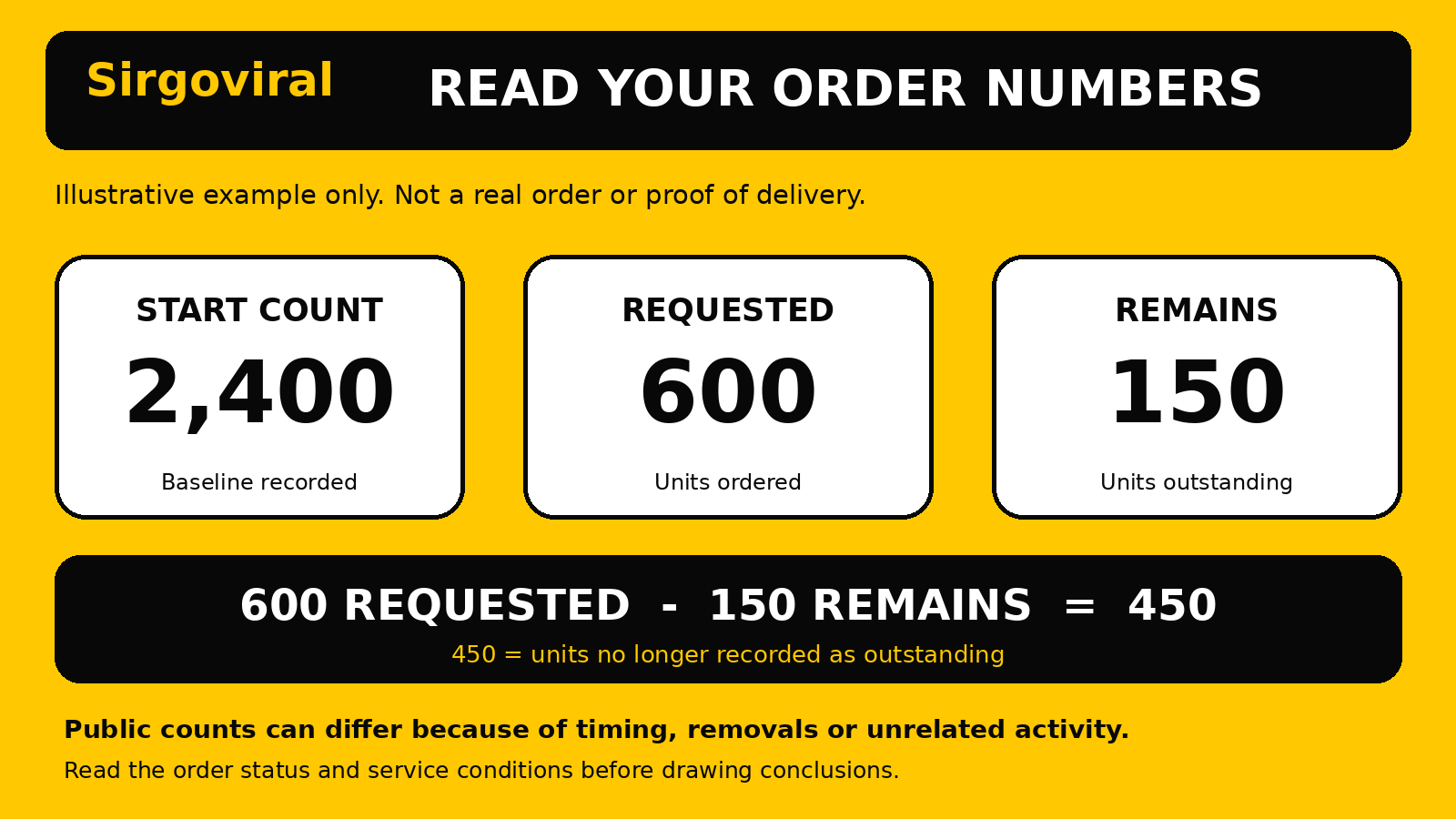
Suppose a public profile shows 2,400 followers when the order system measures it. The recorded start count might be 2,400. This is a reference point, not an amount delivered. If the customer requests 600 additional followers, the simple arithmetic target would be 3,000, assuming nothing else changes.
Real profiles do change. People may follow or unfollow naturally, a platform may remove activity, and public counts may update at a different time from an order system. Some services may not produce a usable start count at all. If the field is blank, zero or looks inconsistent, do not assume that the account really started with zero followers.
The underlying panel software supports both start-count records and order-status fields, but the accuracy and availability of a reading depend on the service configuration.
What does remains mean on an SMM order?
Remains usually represents the portion of the requested quantity still outstanding in the order system. For a conventional quantity-based order, a simple calculation can help you interpret it:
Requested quantity minus remains = quantity the system reports as no longer outstanding.
That is a way to read the order record, not an independent delivery audit. Some services use different fulfilment rules, and a partial or cancelled order can leave an outstanding figure without further delivery being expected.
Do not mistake remains for money in your wallet, a guaranteed refund amount or a promise of future delivery. Any credit or adjustment must be checked against the actual order terms and wallet history.
A worked example: 600 requested, 150 remains
Imagine a Nigerian business owner orders 600 units for a public social media profile. These are fictional numbers for explanation, not a Sirgoviral order or a performance claim.
- Start count: 2,400, the baseline recorded by the system.
- Requested quantity: 600.
- Remains: 150.
- Calculated non-outstanding quantity: 600 minus 150 = 450.
- Illustrative public total: 2,400 plus 450 = 2,850, only if no unrelated changes occurred and the recorded units are reflected publicly.
The arithmetic does not establish that 450 genuine followers, likes or views were delivered. It only explains what the numbers would suggest under simplified conditions. Check the actual link and order status before drawing conclusions.
Why might the public count differ from the order numbers?
A mismatch does not automatically mean either the panel or the social platform is wrong. Consider several possibilities before taking action:
- Timing: the baseline may have been recorded after you submitted the order, while the public number was observed earlier.
- Unrelated activity: genuine followers, likes or views can arrive from normal audience behaviour.
- Removals: users may unfollow, remove likes or have activity removed by a platform.
- Different measurement: a service may count a metric differently from the number visible on your screen.
- Wrong target: the saved link or selected service may refer to a different post or profile.
- Order state: the system may still be processing, or may have stopped at a partial result.
A visible increase can include organic activity, so it cannot isolate what the order contributed.
How to check your Sirgoviral order record
Sirgoviral says registered users can follow order progress from their account. If you already have an order, use its actual record rather than placing a new one to test the figures.
- Sign in to your Sirgoviral account and open the available order-history or tracking area.
- Find the order ID and confirm the target link and selected service.
- Check the requested quantity, status and any start-count or remains fields displayed for that order.
- Compare the record with the public post or profile, noting the date and time of your observation.
- If the figures remain unclear, contact the support option shown in your account and provide the order ID, relevant link and a concise explanation.
Do not share your Sirgoviral password or API key in a support message. The Sirgoviral API guide also tells resellers to keep API keys on their servers and check an order's status before retrying a request. Its sample values are examples, not proof of any customer's order or current naira pricing.
What if remains is zero but the visible count looks lower?
First check whether the order status says Completed, and make sure you are viewing the correct post or profile. Compare the recorded start count, requested quantity and current visible metric.
Do not assume zero remains means permanent engagement or a guaranteed public total. Some activity may disappear, counts can be displayed differently, and order records may need review. Ask support to review the order before placing another on the same link.
What if the status says Partial or In progress?
In progress generally indicates that the order system has not yet marked the process finished. A non-zero remains value can be consistent with that status. Avoid guessing a delivery deadline from the number alone; check the selected service's published conditions.
Partial generally means the system records less than the full requested quantity as fulfilled. A remains figure can help describe the difference, but it does not by itself confirm the amount or timing of any refund. Review the order record, wallet history and service conditions. If they do not agree, request clarification using the order ID.
For a status problem, consult the order-support information for that service.
Common mistakes to avoid
- Treating start count as delivered quantity. It is the recorded baseline, not the order's result.
- Calling remains a refund. It normally describes units, not naira or wallet credit.
- Ignoring the status. A figure has a different meaning when an order is ongoing versus partial.
- Placing a duplicate order immediately. Check the original order first to avoid overlapping records and additional charges.
- Using screenshots without timestamps. Record when you observed the public metric.
- Promising a client a fixed outcome. A dashboard count is not proof of genuine audience interest or future sales.
A simple tracking routine for Nigerian resellers
If you manage client orders, privately record the service and order IDs, quantity, baseline, remains, status and check date.
Distinguish what the system reports from what you observed. Say an order shows 150 remaining without claiming a specific number of genuine followers arrived. Consult the exact service conditions before discussing refunds or refills.
Compare services before placing another order
You can compare current Sirgoviral services, rates and order limits and create a Sirgoviral account to explore the available dashboard. Read the exact service description and the relevant social platform's rules before placing an order.
Paid engagement services are separate from organic audience growth. Neither start count nor remains measures trust, meaningful conversations, sales or algorithmic recommendations.
Frequently asked questions
Is start count the number of followers I ordered?
No. It is generally the starting metric recorded for the target. Your requested quantity is a separate field.
If I order 1,000 and remains shows 300, have I received 700?
The simple order-record calculation is 1,000 minus 300 = 700 no longer outstanding. That does not independently prove that 700 units are currently visible or permanent.
Does zero remains guarantee that my order worked?
No. It describes the order system's remaining quantity. Check the status, target link, service terms and actual public metric before making a conclusion.
Does a Partial order automatically refund the remaining amount?
Do not assume so. Check the specific service conditions and your wallet or transaction record. Contact support if an adjustment is unclear.
What should I send support if the figures do not match?
Provide the order ID, service, target link, relevant displayed numbers, current status and dated observations. Never share passwords, one-time codes or a private API key.