How to Create a WhatsApp Click-to-Chat Link in Nigeria
To create a WhatsApp click-to-chat link with a Nigerian number, use the number in international format after https://wa.me/. For a local number beginning with 0, remove that initial zero and add 234. Leave out the plus sign, spaces and punctuation. Use a number registered on WhatsApp.
A working link helps someone open a conversation without saving your number. It does not send a message automatically or guarantee an enquiry. This guide adapts today’s Sirgoviral tutorial for Nigerian online sellers using a contact link on a profile, product page or flyer.
Build the number format carefully
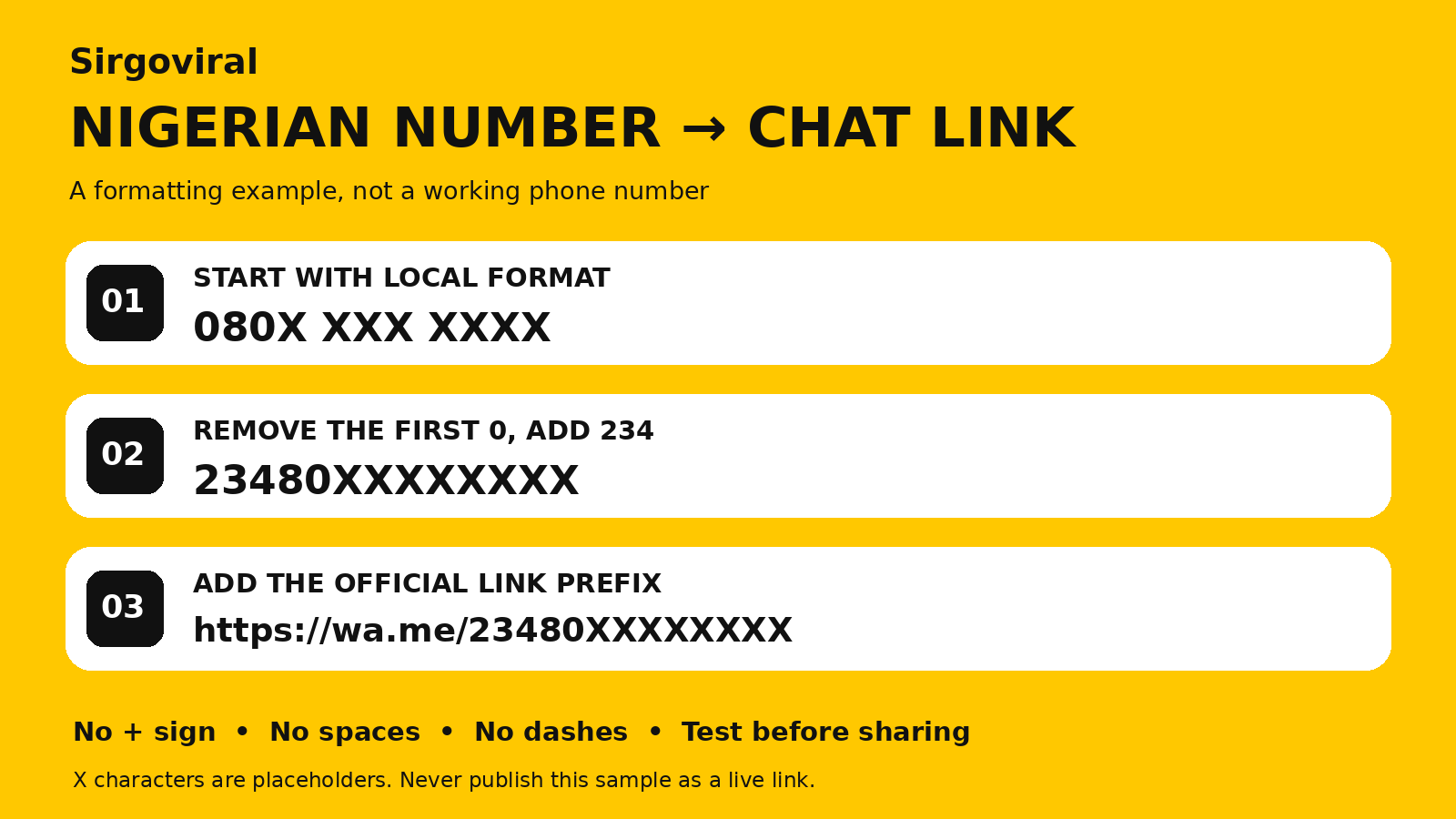
The example below deliberately contains X characters. It is not a working phone number or contact link. Replace the placeholders with your own actual digits before use.
Local example: 080X XXX XXXX
International form: 23480XXXXXXXX
Contact link: https://wa.me/23480XXXXXXXX
Remove the initial local zero, not zeros inside the number. If you already have the correct international form, avoid adding 234 a second time.
WhatsApp documents the wa.me format and the requirement for an active WhatsApp account in its official click-to-chat guide, checked 1 November 2026.
Add a useful prefilled message
To prefill an enquiry, append ?text= followed by a URL-encoded message. For example:
https://wa.me/23480XXXXXXXX?text=Hello%2C%20I%20want%20to%20ask%20about%20BAG%20BWith your valid number, this can open an editable message reading “Hello, I want to ask about BAG B.” The person still decides whether to send it. Keep the message short and avoid inserting private customer information.
Encode the whole message rather than relying on every app to preserve spaces or punctuation. If you use a link-building tool, check its destination and text before sharing the result.
Use the short link in WhatsApp Business instead
The Business app also provides a generated short link. WhatsApp’s short-link instructions describe finding it through the Tools area and Short link controls, with a More menu on some devices.
- Open the business tools available in your app.
- Find Short link and copy the generated address.
- Where offered, set a useful default enquiry message.
- Test the copied address before putting it on your public pages.
The documented controls differ between Android and iPhone, and menus can change. Follow the current in-app route if its labels differ. Customers can edit the default message; it is not a binding order or reliable proof of a campaign source.
Test the link as a customer would
Use another phone or an appropriate browser context to check the destination. You do not need to send a test enquiry to an unrelated person. Confirm it is your intended business account before you publish the link.
| Check | What to look for | What to fix |
|---|---|---|
| Destination | The intended business account | Incorrect digits, country format or an old number |
| Message | Clear, editable enquiry text | Broken encoding or confusing wording |
| Placement | A usable link where customers expect it | Truncated URL or a caption with no clickable route |
| Context | A clear reason to contact the business | A bare link with no product or service explanation |
| Privacy | A contact number you intend to publicise | Accidentally sharing a personal number |
Before printing a flyer or publishing many copies, test the exact final link or code in the finished material. A working source URL does not prove a cropped or mistyped version still works.
What to check if the WhatsApp link is not opening
Start with the copied address and number. Check for missing digits, a duplicated country code, an initial local zero, spaces or punctuation. Confirm the destination number is active on WhatsApp.
If the number is correct, compare the result on another suitable device or browser. Follow any app or web sign-in prompts normally. Do not conclude that a broken link proves the business is blocked or that the recipient has rejected you.
When a link opens the wrong account, remove or correct it on your public material. If you changed the business number, review older profile links, posts and printed assets as well.
Give the link a specific purpose
For a seller, the wording around the link matters. “Ask about sizes” explains a task more clearly than “Click here.” A service business could use “Ask about available dates” or “Request the package details.”
Try one enquiry route with a recognisable product or offer name. For example: “Use the business-chat link and send BAG B with your preferred colour and delivery area.” Only ask for information you need at that stage.
Where the profile or website has a dedicated link field, use the controls available to you and test the saved result. If a post caption does not provide a working link, explain where the actual contact route is located.
Do not confuse a chat link with a channel link
A contact link is for reaching a business conversation. A WhatsApp Channel link opens a different destination for updates. Label them so visitors know whether they are contacting you or following your content.
For an existing channel, see how to help channel followers become customers. For managing the resulting conversations, use our quick-replies guide and chat-list guide.
Review enquiries without overstating attribution
A prefilled message can help your team recognise an offer. Customers can edit or remove it, however, and may have seen your business through several routes.
Record reported sources, relevant enquiries and paid orders separately. A chat opening is not necessarily a message, and a message is not necessarily an order. Use our promotion measurement guide when reviewing results.
Where Sirgoviral fits
Test your contact route before paying to promote content. Sirgoviral provides a catalogue of listed social media services; check each package’s deliverable and link requirements in the live catalogue.
A customer contact link is not automatically a valid destination for an SMM order. Use only the profile, post, video or channel input required by the selected service. Paid quantities do not guarantee customer enquiries or sales.
Frequently asked questions
Do I include the plus sign in a wa.me link?
Use the digits in international format without a plus sign or spaces. Check the official format above.
Will the message send as soon as someone clicks?
No. A prefilled message is editable text, and the customer decides whether to send it.
Can I publish my personal number?
Use a number you are comfortable making publicly reachable. Consider a dedicated business contact for customer enquiries.
Does a chat enquiry give permission for every future marketing message?
Do not assume so. Keep the response relevant to the enquiry and obtain the appropriate permission for separate promotional communications.
Test before you promote. Create the contact route, check the destination and make your offer clear. Explore Sirgoviral’s practical guides and compare current services when you have a defined promotion requirement.